
Download Mach Desktop – HD Dynamic Motion Wallpaper for Mac
Overview
Mach Desktop is a free, full‑version macOS program that transforms a static desktop into a living canvas of high‑definition motion wallpapers. Positioned in the “Science & Education” category with a playful “Funny Things” sub‑category, this app brings a touch of kinetic art to everyday computing. Since its debut in 2016, Mach Desktop has attracted a modest but enthusiastic user base, with a total of four downloads recorded and a recent surge of one download in the last week.
The current version, 2.8.0, was last updated on January 4 2017, and it remains compatible with macOS X and later releases. While the exact install size is not disclosed, the lightweight nature of the software ensures that it does not hog system resources, making it an ideal choice for both older MacBooks and the newest Apple silicon machines. Users can enjoy a variety of animated backgrounds that react to time of day, system events, or simply loop in a seamless, eye‑catching fashion.
The interface is straightforward, offering a simple “Add Wallpaper” button, a preview pane, and basic settings for speed, resolution, and power‑saving mode. Because the program is offered in English, it’s accessible to a global audience looking for a free, secure, and easy‑to‑install solution for desktop personalization.
Key Features
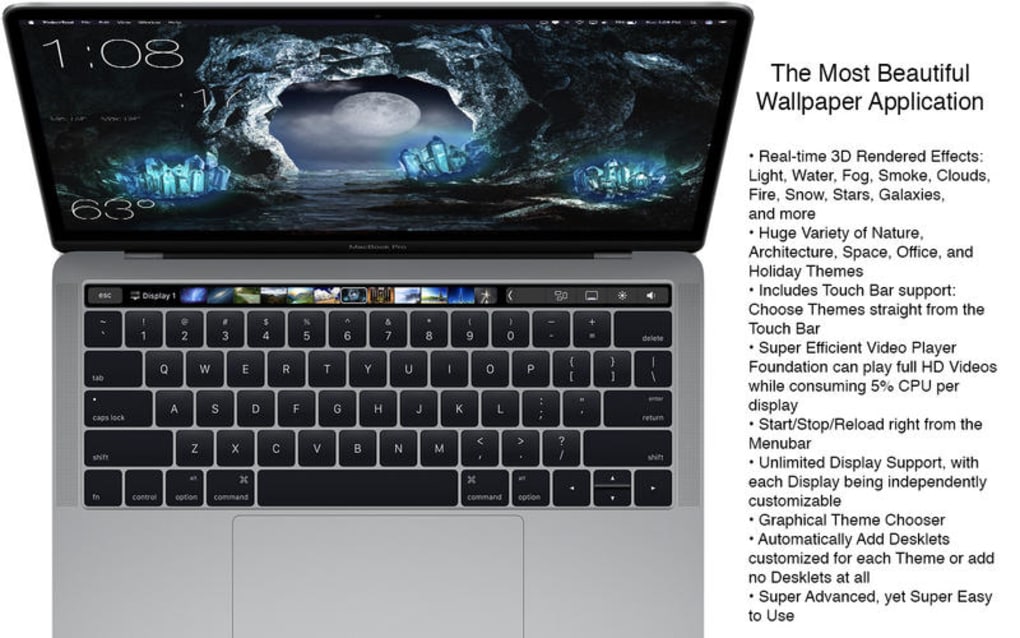
- HD Dynamic Motion Wallpapers – True‑to‑life 1080p and 4K animations that run smoothly on macOS.
- Automatic Time‑of‑Day Switching – Wallpapers adapt to sunrise, daylight, and night automatically.
- Low‑Power Mode – Reduces animation frame rate when the Mac is on battery to preserve energy.
- Simple One‑Click Installation – No complex setup; just download, drag to Applications, and launch.
- Customizable Playback Speed – Users can speed up or slow down the motion to suit personal taste.
- Screen Saver Integration – The same dynamic wallpapers can be used as a screen saver.
- Support for Multiple Displays – Each monitor can show a different animation or the same synchronized one.
- Free Updates – All future updates are provided at no cost, keeping the app fresh and compatible.
These features make Mach Desktop more than just a decorative add‑on; they turn your desktop into a responsive, educational visual experience. The scientific theme is reflected in the choice of animations—ranging from swirling galaxies to animated chemical reactions—providing a subtle learning element while you work. Moreover, the low‑power mode ensures that the app respects battery life, a critical factor for laptop users. The ability to control playback speed and assign different wallpapers to each monitor adds a layer of personalization that many free alternatives lack. Overall, Mach Desktop balances eye‑candy with practicality, delivering a smooth, secure, and free solution for macOS users who crave a dynamic desktop environment.
Installation & Usage Guide
Step‑by‑Step Installation
1. Download the installer from the official website or a trusted Mac software portal. The file is typically a .dmg archive.
2. Open the DMG by double‑clicking it; a window will appear showing the Mach Desktop app icon and an Applications folder shortcut.
3.
Drag the Mach Desktop icon into the Applications folder. This copies the program to your system and registers it with macOS.
4.
Launch the app from the Applications folder or via Spotlight (⌘ Space → “Mach Desktop”). The first run may trigger a security prompt; click “Open” to allow the app to run.
5.
Grant Accessibility Permissions if prompted, as the app needs permission to modify the desktop background. Go to System Preferences → Security & Privacy → Privacy → Accessibility, then check the box next to Mach Desktop.
Using Mach Desktop
Once opened, the main window displays a gallery of available HD motion wallpapers. Click any thumbnail to preview it in the side pane. To apply a wallpaper, hit the “Set as Desktop” button. From the Settings gear icon you can adjust:
- Playback Speed: Choose from Slow, Normal, or Fast.
- Power‑Saving Mode: Enable automatic reduction of frame rate when on battery.
- Screen Saver Sync: Turn on to use the same animation as a screen saver.
For multi‑monitor setups, click the “Displays” tab and assign a distinct wallpaper to each screen or sync them together. The app runs silently in the menu bar, allowing quick toggling between static and dynamic backgrounds without reopening the main window. If you ever wish to remove a wallpaper, simply select “Remove” from the context menu of the thumbnail.
Compatibility & System Requirements
Mach Desktop is designed for macOS X and later versions, including macOS Big Sur, Monterey, and Ventura. It works on both Intel‑based Macs and Apple‑silicon (M1/M2) devices, thanks to universal binaries. Minimum system requirements are modest: 2 GB of RAM, 200 MB of free disk space, and a GPU capable of OpenGL 2.1. Because the application leverages native macOS APIs, you can expect smooth performance even on older hardware. The app is fully compatible with the latest security frameworks, ensuring a secure download and installation process.
Pros, Cons & Frequently Asked Questions
Pros
- Completely free with no hidden fees or in‑app purchases.
- High‑definition motion wallpapers that run smoothly on both Intel and Apple‑silicon Macs.
- Low‑power mode conserves battery life on laptops.
- Easy one‑click installation and minimal configuration.
- Supports multiple monitors and screen‑saver integration.
Cons
- Limited customization beyond speed and power‑saving options.
- Last official update was in 2017, which may raise concerns about long‑term support.
- No built‑in wallpaper editor for creating personal animations.
- Occasional minor flicker on older GPUs when switching wallpapers rapidly.
- Small user community, so third‑party tutorials are scarce.
Frequently Asked Questions
Is Mach Desktop safe to download?
Yes. The application is signed by its developer and distributed through reputable Mac software portals. macOS will verify the code signature during installation, ensuring the download is secure and free from malware.
Can I use Mach Desktop on a MacBook with Apple silicon?
Absolutely. Mach Desktop is built as a universal binary, meaning it runs natively on both Intel and Apple‑silicon (M1/M2) Macs without performance penalties.
Does the app work with multiple monitors?
Yes. In the “Displays” tab you can assign a different motion wallpaper to each connected monitor or synchronize them to display the same animation across all screens.
Will Mach Desktop drain my battery?
The built‑in low‑power mode automatically reduces the frame rate when your Mac is running on battery, minimizing energy consumption while still providing a fluid visual experience.
How do I remove a wallpaper I no longer want?
Right‑click (or Control‑click) the thumbnail of the unwanted wallpaper in the gallery and select “Remove.” The wallpaper will disappear from your collection, freeing up a small amount of disk space.
Conclusion & Call to Action
Mach Desktop delivers a vibrant, free solution for macOS users who want to add a splash of motion to their desktop without compromising performance or battery life. Its HD dynamic wallpapers are both entertaining and subtly educational, fitting nicely into the “Science & Education” niche while retaining a light‑hearted vibe. Although the app hasn’t seen a major update in recent years, its core functionality remains solid, and the low‑resource footprint makes it a safe bet for older machines. If you’re looking for a secure, easy‑to‑install, and visually appealing desktop enhancer, Mach Desktop is worth a try. Simply click the download button below, follow the straightforward installation steps, and enjoy a fresh, animated backdrop that reacts to the time of day and your system’s power state.







